
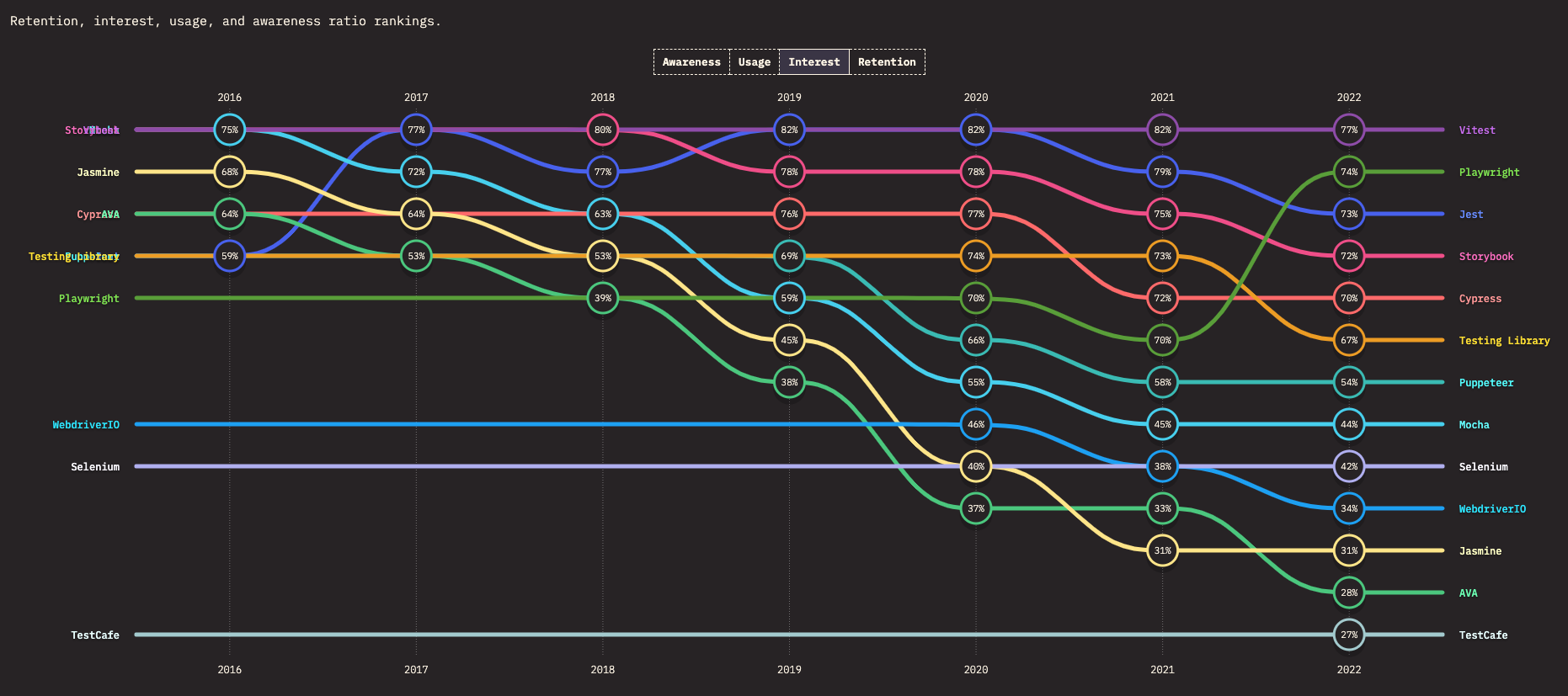
Why bother migrating to Vitest?
Vitest is a modern test runner with improved perfomance and developer experience comapred to many other existing alternatives, which explains its growing popularity.
More specifically, Vitest simplifies configuration, supports TypeScript & ESM, and popular component libraries out of the box. Last but not least, it comes with code coverage analysis, and overall, saving hours of tedious work for developers.
But, the manual migration from Mocha.js to Vitest could take a considerable amount of time, especially when you have a lot of test suites.
What if there were code modification bots that could automate the entire migration process?
Codemod: The code automation platform
Building codemods requires knowledge of abstract syntax trees and compiler internals. The Codemod platform simplifies this by providing tools to build, test, share, and run codemods at any scale:
- Build : Use Codemod Studio to create and test codemods visually, powered by JSSG (our primary transformation engine built on ast-grep).
- Share : Publish codemods to the Codemod Registry , making them available to colleagues or the community.
- Run : Discover and run codemods with a single CLI command.
- Orchestrate : Use Codemod Workflows to chain multi-step migrations across repositories.
Mocha to Vitest migration with Codemod.com
1. Build the codemod
To build a codemod with Codemod Studio, you provide code snippets showing the before and after states of the transformation. The Studio uses AI to generate the codemod logic, which you can then refine and test interactively.
Imagine we have an existing Mocha.js-compatible test file:
Imagine we have an existing Mocha.js-compatible test file with the following code, which we place in the “before” snippet:
import type { Context } from 'mocha';
import { expect } from 'chai';

describe('Test Suite 1', function (this) {
    beforeEach(() => {
        doAThing();
    });

    it('addition', () => {
        expect(1 + 1).to.equal(2);
    });

    afterAll(() => {
        doBThing();
    });
});
With Vitest, we would write the test file in the following way, which we place in the “after” snippet:
import { describe, it, expect, beforeEach, afterAll } from 'vitest';

describe('Test Suite 1', () => {
    beforeEach(() => {
        doAThing();
    });

    it('addition', () => {
        expect(1 + 1).to.equal(2);
    });

    afterAll(() => {
        doBThing();
    });
});
As you can see, in Mocha.js describe, beforeEach, it and afterAll functions exist in the global scope. Additionally, we chose to use the expect function from the chai library explicitly for test assertions. In Vitest, we need to import all of these functions from the vitest package.
import type { FileInfo, API, Options } from 'jscodeshift';
export default function transform(
    file: FileInfo,
    api: API,
    options?: Options,
): string | undefined {
    const j = api.jscodeshift;
    const root = j(file.source);

    // Helper function to preserve leading comments
    function replaceWithComments(path, newNode) {
        // If the original node had comments, add them to the new node
        if (path.node.comments) {
            newNode.comments = path.node.comments;
        }

        // Replace the node
        j(path).replaceWith(newNode);
    }

    // Check if beforeEach and afterAll are used in the code
    const isBeforeEachUsed = root.find(j.Identifier, { name: 'beforeEach' }).size() > 0;
    const isAfterAllUsed = root.find(j.Identifier, { name: 'afterAll' }).size() > 0;

    // Find all import declarations
    root.find(j.ImportDeclaration).forEach(path => {
        // Check if import source is 'chai'
        if (path.node.source.value === 'chai') {
            // Replace 'chai' with 'vitest'
            path.node.source.value = 'vitest';
            // Add 'describe', 'it', 'expect', 'beforeEach', 'afterAll' to import specifiers conditionally
            const importNames = ['describe', 'it', 'expect'];
            if (isBeforeEachUsed) importNames.push('beforeEach');
            if (isAfterAllUsed) importNames.push('afterAll');
            path.node.specifiers = importNames.map(name =>
                j.importSpecifier.from({ imported: j.identifier(name), local: j.identifier(name) })
            );
            // Replace the node with the new node, preserving comments
            replaceWithComments(path, path.node);
        }
    });

    // Find all function declarations
    root.find(j.FunctionExpression).forEach(path => {
        // Check if function has 'this' as parameter
        if (path.node.params.some(param => param.type === 'Identifier' && param.name === 'this')) {
            // Remove 'this' from parameters
            path.node.params = path.node.params.filter(param => !(param.type === 'Identifier' && param.name === 'this'));
            // Replace function declaration with arrow function expression
            const arrowFunction = j.arrowFunctionExpression.from({
                params: path.node.params,
                body: path.node.body,
                async: path.node.async,
            });
            // Replace the node with the new node, preserving comments
            replaceWithComments(path, arrowFunction);
        }
    });

    return root.toSource();
}
Using the Studio's AI assistance, we generated a codemod to handle this transformation. The generated codemod served as a base for the final one called mocha/vitest/migrate-tests. We refined and improved it based on the edge cases we discovered during testing.
We also built a second codemod called mocha/vitest/migrate-configurations that removes all Mocha.js configuration files, drops the library from all package dependencies, and adds Vitest instead.
Both codemods were combined into a recipe called mocha/vitest/recipe which can be discovered, shared, and run from the Codemod Registry.
2. Run the codemod
Run the recipe with a single CLI command:
npx codemod mocha/vitest/recipeWe ran the recipe over 3 of our own repositories:
The first two had a handful of Mocha.js test suites and we migrated them first to spot problems early in the development. Once the codemod was ready and accurate, we merged them into the Codemod Registry. Once codemods are published to the registry, they automatically become accessible to the community via Codemod.com VSCode Extension or the Codemod.com CLI.
And shown below, with the help of our codemod, we automated the bulk of the migration for over 60 test files spread across the entire Codemod Registry monorepo.
We repeated the same steps for the Codemod Engine Node. During testing, we found out Vitest does not transpile TypeScript files if we use them as entry points for thread workers. This functionality used to work with Mocha.js supported by the ts-node/esm dependency. We replaced the path to the TS file with a path to the built ESM files to restore the feature.
3. Final tweaks
When migrating the Codemod Registry, we found unhandled cases, like:
- the usages of the
Contexttype from Mocha.js, - the usages of the
thisvariable in test bodies.
We could fix the former problem by putting the existing codemod into the Codemod Studio and asking the AI helper to fix it. With the latter, we fixed the test bodies manually due to the small number of such occurrences.
Since the Codemod.com CLI can execute local codemods, we used it to see if the changes to the codemod resulted in the correct transformation of the codebase in question. This speeded up the development process tremendously.
The impact
With the help of the recipe, we were able to migrate three repositories in a short amount of time. We reused the same code within the recipe for all the projects. Now, other developers may leverage our work as well.
If we were to manually migrate the Codemod Registry alone, we would have to:
- delete the 60+ existing Mocha.js configuration files (1 minute for each),
- remove Mocha.js and add Vitest dependencies in 60+ package files (1 minute for each),
- drop Mocha.js types and put the Vitest import statements in 60+ tests files (2 minutes for each).
It would have taken around 4 hours of mundane work to perform the migration without ensuring we had not introduced any mistakes.
After ensuring the proper quality of the code automation agents, we executed the recipe that transformed over 200 files instantly. We removed all Mocha.js configuration files and thus reduced the complexity of the test suites. Our platform made it all available at the push of a button.
Conclusion
This article walked through migrating from Mocha to Vitest using automated codemods. Key takeaways:
- Codemods are powerful code transformation tools that can automate tedious migration work at any scale.
- AI-assisted codemod creation through Codemod Studio and Codemod MCP lets any developer build codemods quickly.
- Open source : With Codemod's platform, you can automate crucial yet tedious tasks for yourself, your colleagues, and the community.